Monday, 07:40. Deck space is confirmed for tonight's Travemünde–Trelleborg departure — your rate with that line is the one that makes the trip work. You plan the route and the router draws Rostock–Gedser, because on its generic numbers that crossing looks better. It has no idea a booking exists.
09:10, next job. The customer is one of those who reimburse national-road kilometres and send péage line items straight back. The router puts the truck on the A6, because the A6 is faster for a truck it knows nothing about.
09:40, the freight board. An offer says DE-68 to FR-69 and gives you two minutes. The routing tool wants a street address you do not have.
Three normal moments from one normal morning, and in all three the "optimal" route is not your route. The router optimizes distance, time and road classes for a generic truck. Your route is decided by things it cannot see: the rate you hold with one ferry line and not another, what this customer pays for, what your operations manual says about tunnels after that one bad trip, and the fact that at 09:40 you are not planning a trip at all: you are pricing one.
The usual fix is tricking the router: fake via points on approach roads, addresses for places nobody will stop at, a route accepted as roughly right and corrected over the phone with the driver. It works, slowly, and every trick has to be redone on the next plan.
Transport Nomad now takes those instructions directly. Three controls, one for each of the morning's three problems.
Tell the route what it may use
In Route Settings there are six switches: turns, tolls, highways, ferries, car-shuttle trains, tunnels. Each one flips between Allow and Avoid, and each flip redraws the route and recalculates the full cost for the roads the new variant actually uses.
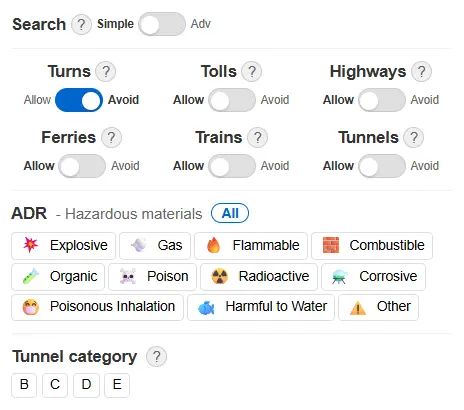
That last part is the point. "Do we pay the péage or run the N-road for this customer" stops being a debate and becomes two totals: flip Tolls to Avoid, the route moves, the toll line shows what genuinely remains (on some corridors that is not zero, and it is better to see it than to pretend), fuel and hours update, and the difference between the two totals is what the customer's no-péage policy costs. You quote accordingly.
One detail worth knowing: the switches reset when you come back to the planner. That is deliberate. A forgotten "avoid ferries" from Friday would quietly reroute and reprice everything you quote on Monday, and nobody notices until the margin is gone. Two clicks to set it again is the cheaper failure.
The full walkthrough of all six switches is in the avoid options guide.
Put the route on the ferry you booked
Ferry rates are negotiated per line. What you pay Travemünde-side has nothing to do with the Rødby price list, the departure has to fit the driver's remaining hours, and deck space this week is a fact, not a setting. The router picks a crossing off generic costs — so on corridors with real choice, Baltic especially, its pick is regularly not your booking.
The fix is the same gesture you use to move the route onto a different road: grab the route line, drag it onto the ferry line you booked (they are drawn as dashed lines across the water), let go. The route recalculates through that crossing, your stored price for that line lands in the cost panel, and the sea leg is correctly kept out of fuel and tolls.
Send the route link to a colleague or paste it into the order, and it opens with the same crossing pinned. The mechanics, including what happens when you miss the line, are in the ferry choice guide.
Search the way the job arrives
The 07:40 job and the 09:40 job need opposite things from the search box. When you know the consignee, you want to type the company's name, tolerate a typo, and land on the actual truck gate. That is Advanced mode, and it is the default. When all you have is DE-68, you want the fragment to resolve to a postcode zone without wading through company hits — that is Simple mode, one toggle away in Route Settings, and it stays the way you set it.
The endpoint decides more than it looks: which side of the city the truck approaches from, whether a toll bridge sneaks in, how long the last kilometres take. A quote is only as good as its two endpoints, which is why there are two search modes and not one. Details and the comparison table are in the search modes guide.
What stays yours
None of this predicts anything. Transport Nomad does not know Thursday's backload market, the going rate on your corridor, or whether the customer pays in 30 or 90 days — and it does not pretend to. What it does is take the facts you already have (the booking, the customer's toll policy, the half-known postcode) with one switch, one drag, one toggle, and then count the consequences to the cent: fuel per country, tolls for the roads actually driven, the crossing at your price, hours at your fleet's rate.
You know your contracts. Now the route does too.
See it on a corridor you run. Start the free 14-day trial, plan tomorrow's trip, and put your booking, your customer's rules and your prices into the route before it goes to the driver.