A routing engine returns the route its cost model likes best. Your operation has opinions that no generic cost model can see: a customer who reimburses national-road kilometres and will not pay péage, a load you would rather not put on a ferry deck, a company policy that keeps certain cargo out of tunnels, a driver you do not want threading through U-turns in an artic. Routing software that cannot take these instructions forces you to fake them with via points. Transport Nomad takes them directly.
The Avoid grid
Open Route Settings and find the Avoid features grid: six switches in two rows, each one flippable between Allow and Avoid. Five of them (Tolls, Highways, Ferries, Trains, Tunnels) default to Allow. The sixth, Turns, defaults to Avoid, for reasons covered below.
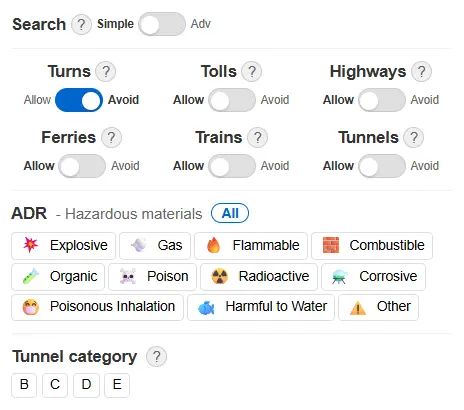
Flip a switch and the route recalculates immediately. Active avoids also show up as small badges at the top of the panel, so a non-standard setup stays visible at a glance instead of hiding two scrolls down.
What each switch does
Tolls
Avoids toll roads where possible. The toll figures in the cost breakdown always reflect the roads actually used, so after flipping the switch you see the real remaining toll, not an estimate for the motorway you just left.
Where this matters most is countries where tolled motorways run parallel to free national roads: France, Spain, Italy. Comparing the péage route against the N-road route stops being a felt guess and becomes two totals you can put next to each other. In countries where distance-based HGV tolling covers nearly the whole main network (the German Maut applies on federal roads too, not just autobahns), there is less to escape, and the switch is more useful as a comparison tool than a savings tool.
Highways
Avoids motorways and other controlled-access roads. Useful when the motorway adds kilometres for no gain on short hops, when you want to keep a local delivery leg on the network it belongs to, or when your vehicle should stay off high-speed roads for its own reasons.
Ferries
No ferry crossings. Hamburg to Copenhagen is the classic case: with ferries allowed, the router may take the Puttgarden–Rødby crossing; with ferries avoided, the route runs over the Great Belt bridges instead. Flip the switch and both variants are a click apart, each with its own kilometres, time and cost.
Operationally this is for loads that should not sail, lines you have no account with, or days when schedule risk outweighs the shorter distance.
Trains
Avoids car shuttle trains, meaning services that carry the truck on rail: Eurotunnel Le Shuttle and the alpine rolling-highway services.
Together with the Ferries switch this gives you clean control over the Channel: avoid Trains and the route takes the Dover ferry; avoid Ferries and it takes the tunnel. You choose the crossing type with one switch instead of forcing it with fake waypoints.
Tunnels
Avoids all tunnels, full stop. This is deliberately a blanket switch. For ADR loads, the precise tool is the tunnel restriction category on your vehicle profile, which knows the difference between a category B and a category E tunnel (see the HGV restrictions guide). The Tunnels switch is for the policy-level decision: this load, this customer, this company rule says no tunnels at all, regardless of what the categories would permit.
Turns
The odd one out: on by default. It steers the route away from difficult tight turns, U-turns and unpaved roads, which is what you want for a tractor-trailer virtually always. Switch it to Allow only when you know the awkward manoeuvre is fine, for example a yard entrance that genuinely requires the U-turn the router is politely avoiding.
"Where possible" means what it says
The avoids are soft. If the only physical way to reach the destination is a tunnel or a ferry, the router will still use it rather than fail with no route. That is the behaviour you want from a switch you flip casually; when you need a hard guarantee that the route never enters a specific area, that is what manual exclusion zones are for, and they are covered in the HGV restrictions guide.
The cost recomputes with the route
Every flip triggers a full recalculation: distance, time, fuel per country, toll per country, crossings. The Allow total next to the Avoid total is the price of the policy, computed on the roads each variant actually drives.
The clip shows a Reims to Lyon run: Tolls flipped to Avoid, the route trades the A-network for national roads, the toll line drops to zero, and the TOLLS badge appears at the top of the panel.
That makes the grid a comparison instrument as much as a routing preference. Does skipping the péage pay on this corridor, with this vehicle, at today's fuel prices? Two clicks, two totals, decided.
Why the switches reset
The avoid switches deliberately return to their defaults when you come back to the planner. This is not an oversight. An "avoid tolls" left on from yesterday's what-if session would silently reroute and reprice every quote you produce today, and you might not notice until the margin is gone. Two clicks to re-enable a setting is cheap; a mispriced week is not. (The Search mode toggle above the grid does persist, because it changes how you find places, never what the route costs.)
The route you would actually drive
Vehicle dimensions and weights keep the route legal. Exclusion zones keep it out of places you have banned. The Avoid grid is the third layer: it makes the route follow your commercial and operational preferences, not just the road network's defaults, and it prices every preference honestly. For choosing one specific ferry crossing rather than avoiding them all, see the ferry crossing guide.
See it on your own route. Start the free 14-day trial, flip a switch on a corridor you actually run, and compare both totals — decided with numbers, not feel.