Every route starts with someone typing a place into a field. A dispatcher does this dozens of times a day, and two situations dominate, pulling the search engine in opposite directions.
In the first, you know exactly where the truck must go. The order names a consignee, say a packaging plant on the edge of Mannheim, and you want the route to end at their gate. What you have is a company name; what you need is a precise point on the map.
In the second, you know almost nothing. A freight-board offer says DE-68 to FR-69 and not much else. There is no company to look for, half a postcode is all you get, and you still need both zones on the map fast, because the quote has to go out before the offer disappears.
No single search engine is best at both jobs. An engine that surfaces companies and tolerates typos will drown a two-digit postcode in irrelevant matches; an engine tuned to resolve postcode fragments cleanly has no business suggesting company names. So Transport Nomad runs two, and puts the choice where you can reach it.
Where the switch is
Open Route Settings and look at the top of the panel: a row labelled Search with a toggle between Simple and Adv. Advanced is the default. The switch takes effect on your very next keystroke, and the choice is remembered in your browser, so if you prefer Simple you set it once and forget it.
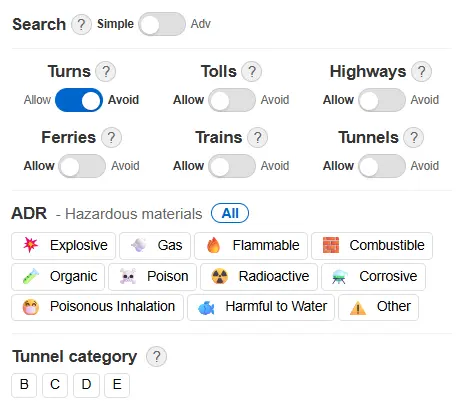
The mode only changes how suggestions are found while you type. It never touches the route itself, so flipping it does not trigger a recalculation.
Advanced: companies, addresses, postcodes, place names
Advanced search looks through everything: street addresses, postcodes, town and city names, and, crucially for transport, company and terminal names. It also tolerates typos, which matters when you are transcribing a consignee name from a phone call or a scanned order.
The company search is the part that changes daily work. Instead of asking the customer for a street address, translating it into the planner, and hoping the pin lands on the right side of the premises, you type the company name, pick the right match from the list (each suggestion carries its full address, so you can tell the Mannheim plant from the Hamburg one), and the point drops on the actual site.
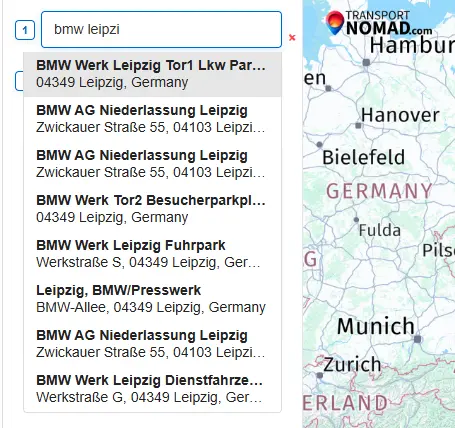
Large sites often expose several entries: the truck gate, the visitor car park, individual branches. In the screenshot above, a misspelled fragment of a plant's name is enough to surface the site's dedicated truck entrance as its own suggestion, and that is the one you route to.
This precision carries through the whole calculation. The final kilometres of a route decide which side of a city you approach from, whether you cross a toll bridge, and how much urban crawling the driver does. A route that ends at the real gate instead of "somewhere in Mannheim" produces kilometre, time and toll figures you can quote without padding.
Simple: addresses and postcodes, built for the half-known
Simple mode deliberately searches a narrower space: addresses, postcodes and place names only. No companies, no points of interest. What you get in return is much better behaviour on partial postcodes, which is exactly what freight-board quoting runs on.
Board offers rarely give you an address. They give you a zone: DE-68, FR-69, PL 41. In Simple mode you type the fragment you have, optionally with a country or town name next to it, and the suggestions resolve to postcode areas instead of a noisy mix of companies and streets that happen to contain the same digits. In the screenshot below, "de 683" is enough to surface the 683xx Mannheim codes at the top of the list.
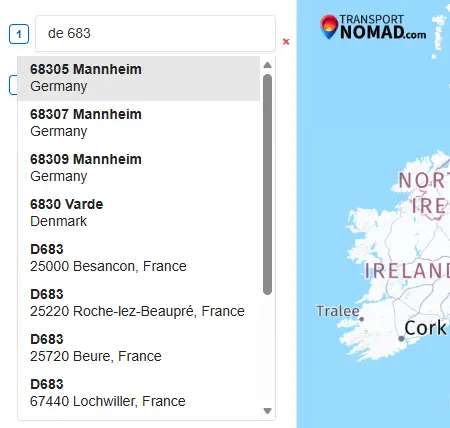
For a quoting session this is the difference between fighting the search box and not thinking about it: zone in, zone out, route drawn, floor price calculated, quote sent.
Side by side
| What you type | Advanced | Simple |
|---|---|---|
| Full street address | Yes | Yes |
| Town or city name | Yes | Yes |
| Full postcode | Yes | Yes |
| Partial postcode | Works, mixed with other matches | Strongest use case |
| Company or terminal name | Yes | Not searched, by design |
| Input with typos | Tolerated | Less forgiving |
What the mode never changes
A few input paths work identically in both modes, so switching costs you nothing:
- GPS coordinates pasted into a field are used as-is, in both modes.
- Typing a full address and pressing Enter without picking a suggestion geocodes it the same way in both modes.
- Dragging markers on the map and dragging the route are unaffected.
Both modes are available on every plan, including the free tier.
Which mode to run
Most dispatchers can stay on Advanced most of the day: when you know the destination, company search plus typo tolerance is simply faster. Flip to Simple when you sit down to a quoting session with the freight board open and postcodes are all you have. Since the choice sticks per browser, a workstation used mainly for quoting can stay in Simple permanently.
Endpoints are where cost precision starts
A route is only as precise as the two points it connects. Every figure Transport Nomad computes downstream, fuel per country, toll per road actually used, working time, the cost per kilometre on the offer you are about to accept, inherits the quality of the endpoints you set. Two search engines exist so that in both of the situations a dispatcher actually faces, the known gate and the half-known zone, the endpoint is right on the first try.
See it on your next quote. Both search modes are in the free tier — create an account, flip to Simple, and price the next board offer from half a postcode.