After the trailer comes the cargo. And like trailers, the cargo arrives in remarkably few shapes. A pallet from a beverage plant in Madrid is the same size as a pallet from a furniture factory in Lithuania. An IBC from a Belgian chemical site fits the same forklift as one from a Polish food processor. That uniformity is not an accident either: it lets goods move between trucks, warehouses, and countries without anyone stopping to remeasure.
The 3D Load Planner ships with 8 ready-made cargo units that cover the units actually used in European logistics, plus a custom box for everything else. This guide walks through what each one is, why it ended up standard, and how to use them in a plan.
The 8 standard cargo units
| Unit | Footprint |
|---|---|
| EUR Pallet | 1.20 × 0.80 m |
| Industrial Pallet | 1.20 × 1.00 m |
| UK Pallet | 1.20 × 1.00 m |
| Half Pallet | 0.60 × 0.80 m |
| IBC | 1.20 × 1.00 m |
| Steel Coil | Ø 1.80 m, length variable |
| Roll | Ø 0.80 m |
| Custom Box | user-defined |
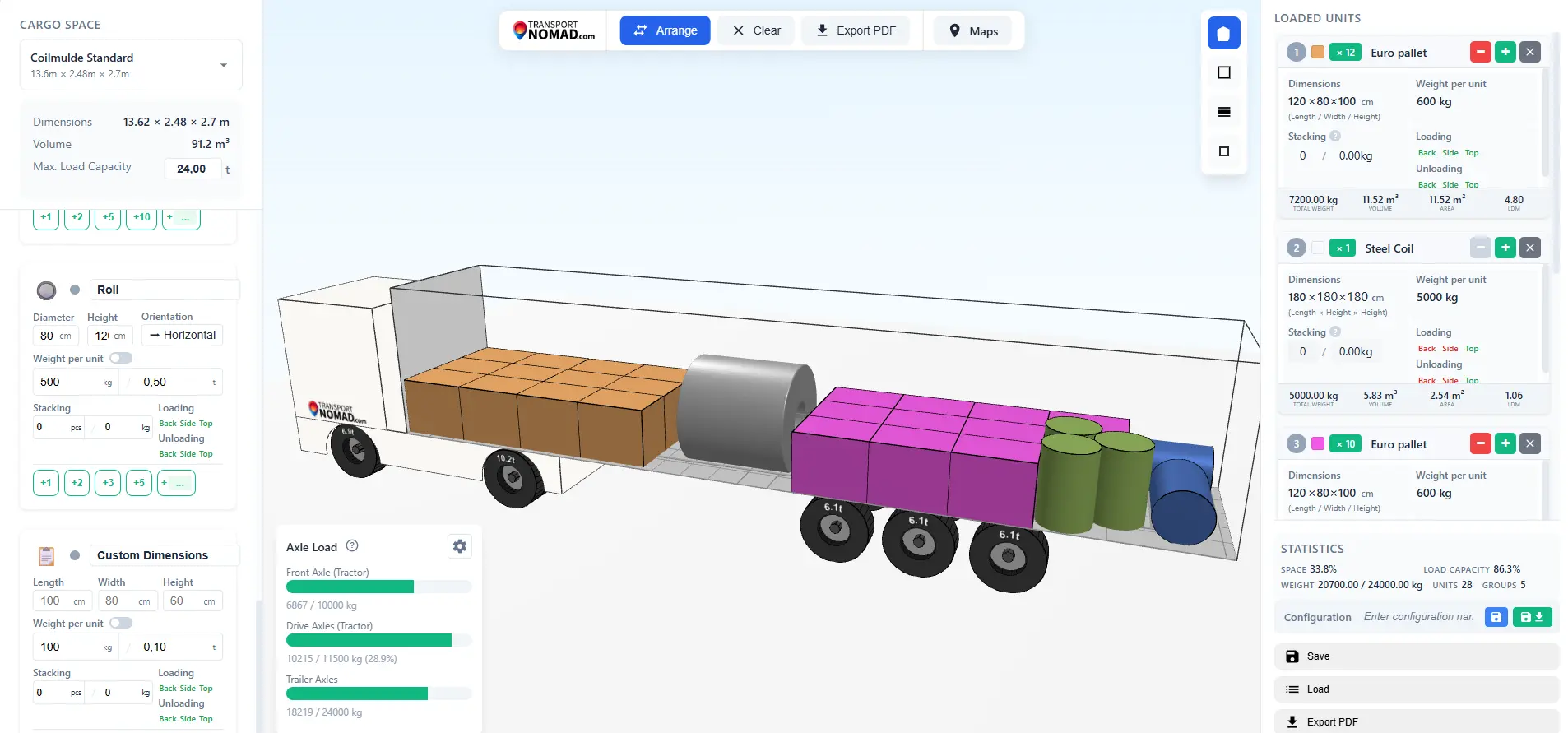
The footprints above are real standards: every EUR pallet in Europe is 1.20 × 0.80 m, every industrial pallet 1.20 × 1.00 m, every standard IBC 1.20 × 1.00 m. Height, weight, and stacking rules are not standards at all, because they depend entirely on what you are shipping. An empty pallet is 15 cm tall; a pallet loaded with cardboard boxes might be 1.5 m; a pallet loaded with stacked steel sheets might be 30 cm but five tonnes. The planner ships with starter values to keep new plans realistic, and you set the actual numbers per unit on every plan.
Every dimension on every unit is editable, including the footprint. If you have a pallet that is 1.20 × 0.85 m for some reason (a non-EPAL design, a custom-built pallet, cargo overhanging slightly past the wood), change the one dimension on the EUR template directly. You do not need to start over from Custom Box and re-enter everything. The 8 ready-made units exist to speed up planning, not to constrain it: they save you from typing eight standard footprints over and over, and any unit can be tweaked in place when reality differs by a few centimetres.
Why these units are "standard"
Cargo units exist as standards for the same reason trailer sizes do: every link in the chain pushed for shared dimensions so handoffs would just work. Three forces did most of the shaping.
Pallet pooling systems were the first big lever. EUR / EPAL pallets entered circulation in 1961 through the railway operators' union (UIC standard 435), starting in Sweden and Germany and then spreading across the continent. The point was interchangeability: a manufacturer ships goods on an EUR pallet, the retailer keeps it, the next supplier collects it from the retailer, fills it with new goods, and the cycle repeats. Today there are roughly 500 million EUR pallets in circulation. CHEP runs its own blue-pallet pool on a 1.20 × 1.00 m footprint, mostly for heavier goods. Once these pools existed, packaging machinery, racking, and trailer floors all converged on those two footprints.
Forklift fork spacing locked the geometry in further. EUR pallets have notches at fixed positions so any forklift in the pool can pick them up from any side. Industrial pallets have block construction (nine wooden feet) that lets forks enter from four sides instead of two. Once millions of forklifts share these specs, no manufacturer of new equipment wants to deviate.
Container and trailer loading patterns were the final filter. A 13.6 m trailer holds 33 EUR pallets in three rows of eleven (or 34 if you turn the last few sideways). A 40' container holds 25 EUR pallets or 21 industrial pallets in a single layer. Every dimension that comes up in pallet logistics has been quietly optimised against these counts.
The result is the small set of standard units in the table above. The planner uses them because the industry uses them.
The pallet family: EUR, Industrial, UK, Half
Four of the eight cargo units are pallets, covering the bulk of palletised European freight.
EUR Pallet (1.20 × 0.80 m) is the workhorse. EPAL-certified, fork-accessible from all four sides via notched bottom boards, used for general cargo, FMCG, packaged goods, anything that fits the footprint. It is the default starting point for almost any pallet-based load plan.
Industrial Pallet (1.20 × 1.00 m) is the CHEP-style block pallet, also called the GMA pallet in North America. The wider footprint plus block construction makes it stronger and more accessible for forklifts. Used for heavier goods: beverages, paper rolls, automotive parts, machinery components.
UK Pallet (1.20 × 1.00 m) shares dimensions with the industrial pallet but is built lighter for non-rotating one-way use, common in UK domestic logistics and trade with Ireland. Used when goods cross to or from the UK and a CHEP pool exchange is not practical.
Half Pallet (0.60 × 0.80 m, also known as the Düsseldorf pallet) is half an EUR pallet footprint, designed for retail. It fits standard supermarket aisles, is light enough to be moved manually, and lets brands ship promotional displays straight to the shop floor. Stacks 4 high in the planner; total stack weight stays modest at 500 kg.
When in doubt between EUR and Industrial: pick EUR for general cargo, Industrial for anything heavy or where the supplier's standard is the wider pallet.
IBC: Intermediate Bulk Container
The IBC is a 1 000-litre cube of liquid in a steel cage on a pallet base, 1.20 × 1.00 × 1.18 m. A full IBC of water weighs around 1 000 kg, but loaded weight depends on the density of the contents (oil, acids, syrups all have different densities, so you set the actual weight in the planner). Used for industrial chemicals, food-grade liquids, lubricants, additives. For dangerous goods, IBC design and testing is governed by chapter 6.5 of the ADR agreement; the footprint follows the industrial-pallet module.
The Load Planner treats IBCs as non-stackable by default. Real IBCs can sometimes be stacked two high if both the bottom unit and the storage layout permit it, but for road transport the prudent assumption is single layer. Loading is rear or top only, because the format is too tall to slide in sideways through trailer curtains.
Steel Coil: the heavy specialist
A Steel Coil in the planner is a fixed-diameter 1.80 m cylinder of variable length. Real coils range from 3 to 25 tonnes depending on the mill output and the strip thickness, so the weight per coil is always something you enter yourself. Used for steel-mill outputs going to stamping plants, automotive bodywork suppliers, and construction-steel buyers.
Steel coils can only be loaded from the top, because they require an overhead crane or a forklift heavy enough to lift several tonnes. They never stack on top of each other on the road. The Load Planner pairs them naturally with the Coilmulde trailer templates, where they sit in the longitudinal groove to prevent rolling.
Roll: cylindrical loads on end
A Roll is a vertical cylinder, 0.80 m diameter × 1.20 m tall by default, but both dimensions and weight vary completely with the contents. The classic example is a paper reel for a printing press, but the same shape covers cable drums, plastic film rolls, carpet rolls, and textile bolts.
Rolls do not stack in the planner. They are loaded standing upright through any of the three loading methods (rear, side, top), and securing them is its own discipline: blocks, wedges, and straps to keep them from tipping or rolling once the trailer is moving.
Custom Box: for everything else
The Custom Box is the catch-all. Define the length, width, height, and weight yourself, and the Load Planner treats it like any other unit (placement, stacking, axle calculations all apply). Use it for:
- Machinery and equipment with awkward dimensions that do not fit any pallet
- Crated goods where the crate itself is the unit
- Boxed components of specific size (engines, transmissions, large appliances)
- Project cargo that ships once and does not need a standard category
If you find yourself defining the same custom dimensions repeatedly, that is a sign your business has its own internal "standard": note the numbers and reuse them as a starting point.
What "stack 3 high, 750 kg" really means
Stacking defaults are conservative starting points, not laws of physics. The planner uses them so a fresh plan does not propose a 5-pallet column that would crush the bottom layer.
In practice, stacking depends on what is on the pallet. A pallet of bottled water can take very little weight on top before bottles deform. A pallet of bricks can take several tonnes. The default "3 high, 750 kg" for EUR pallets assumes a typical mixed-goods load where the bottom layer's packaging can sustain 250-350 kg of dead weight. Override this per unit when you know the cargo. Override it down when the cargo is fragile, top-loaded only, or temperature-sensitive (frozen goods often need single-layer transport to maintain airflow).
Weight per unit is not a default at all. There is no "standard pallet weight" or "standard IBC weight" you can rely on, because a pallet of cushions and a pallet of paving stones share the same footprint but are nowhere near the same weight. The planner asks you to enter actual cargo weight per unit on every plan, and that number is what drives capacity, stack limits, and axle calculations downstream.
Loading methods: rear, side, top
Each cargo unit has a list of permissible loading methods, which the Load Planner enforces against the trailer's own constraints.
- Rear loading through back doors works for every trailer type and almost every cargo unit.
- Side loading through curtains works on Standard, MEGA, Coilmulde, and JUMBO trailers, but not on Frigo (rigid insulated walls) or containers (rear doors only). Useful when forklifts can approach from both sides of the trailer, which roughly halves loading time on a full pallet plan.
- Top loading with a crane is mandatory for steel coils, common for heavy machinery, and an option for any other unit when the warehouse is set up for it.
The planner shows which methods are available in the cargo-unit panel and warns when a chosen method conflicts with the selected trailer (steel coil + Frigo, for example, has no compatible loading method).
Picking units in Transport Nomad
Like the cargo-space templates, picking a cargo unit is a single click. Open the cargo-units panel, choose the type, set how many you need and the actual cargo weight per unit, and the planner generates them with the right footprint, stacking limits, and loading methods already filled in. No measuring the pallet you got from a supplier, no remembering whether a CHEP pallet is 1.20 × 1.00 or 1.00 × 1.20, no rebuilding the same template every week. The standards are already in there.
For repeated jobs, save the cargo-unit configuration with the plan and reload it for the next similar shipment.
A simple decision tree
If you are not sure which unit to use, work through this:
- Packaged goods on EPAL pallet? EUR Pallet.
- Heavy goods on CHEP-style block pallet? Industrial Pallet.
- UK domestic or UK-EU trade? UK Pallet if the shipper uses it.
- Retail display, small format, light goods? Half Pallet.
- Liquid in a 1 000 L cube? IBC.
- Steel coil from a mill? Steel Coil + Coilmulde trailer.
- Paper, cable, film, textile in a cylinder? Roll.
- Anything else? Custom Box.
Most plans use one or two unit types. Mixing a few is normal (a Standard trailer carrying 20 EUR pallets and 4 IBCs is realistic). Mixing many types on one trailer is a sign that the load is fragmented and the plan needs to consider stop sequence carefully, which is the topic of a later guide in this series.
What this means for your money
Unit choice looks like a detail and turns into money at the dock. A load priced as 33 straight EUR pallets that actually ships with two IBCs and a machine crate either fits, or it comes back as a second vehicle, an hour of re-loading, or a customer call. Setting the real units with the real weights is a two-minute check that keeps the quoted trailer and the loaded trailer the same trailer.
Summary
European cargo units look standard because they are, the result of pallet pools, forklift specs, and trailer floor optimisations all pointing in the same direction. The 8 ready-made units in the 3D Load Planner cover the formats actually shipped on European roads, and the Custom Box covers what is left. Pick the right unit, set realistic weight and stacking values, and the rest of the plan (placement, axle loads, capacity) falls out of the planner correctly.
Next in this series: how the Load Planner calculates weight distribution and axle load, and how to set it up so the numbers match what your trailer will see at the weighbridge.
See it on your own load. Start the free 14-day trial, pick a trailer in the 3D Load Planner, and drop your real cargo mix into it before the forklift starts.