For dispatchers working with freight exchanges, the workflow looks the same every day. Open TimoCom or Trans.eu, scan the listings, find a promising load, copy the pickup postal code, paste it into the routing tool, copy the delivery postal code, paste again, wait, look at the price, switch back to the exchange, hit the next listing. Multiply by a hundred offers a day and the manual paste-and-switch becomes a real chunk of the working day.
Transport Nomad has a browser plugin that removes that step entirely. Install it once on the browser you use for the exchange, and every listing gets a one-click button that opens the full route on Transport Nomad maps, with all the costs (fuel, tolls, fixed-cost recovery, crossings) already computed.
Install the plugin
The TransportNomad plugin is available for the four browsers most commonly used in transport offices:
- Chrome and Opera. Install from the Chrome Web Store. Opera supports Chrome extensions natively, so the same listing covers both.
- Microsoft Edge. Install from the Microsoft Edge Add-ons store.
- Mozilla Firefox. Install from Firefox Add-ons.
Installation is a single click on each store. The plugin sits in the toolbar and activates automatically when you open a TimoCom or Trans.eu listing page.
One click to see the route
After the plugin is installed, every freight offer on TimoCom and Trans.eu gets a TransportNomad button. Click it and the pickup and delivery locations are pushed straight into Transport Nomad maps. The route appears with the same per-trip breakdown you would see if you had typed everything in manually:
- Distance per country.
- Tolls per country, based on your vehicle parameters.
- Fuel cost, using either Nomad's country-average prices or your custom per-country rates.
- Fixed-cost share, if you have your vehicle's annual costs and working days configured.
- Any tunnel, ferry, or rail shuttle on the way, with the price you have stored for each crossing.
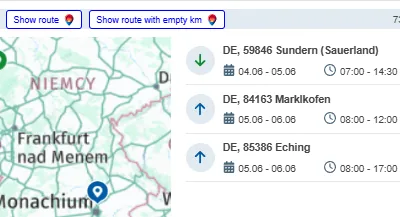
What used to be a thirty-second copy-paste-switch routine becomes a single click. For a dispatcher scanning dozens of offers in a tight bidding window, that compounds quickly.
Loaded kilometres only, or with a positioning leg
The plugin offers two import modes, and you can switch between them per import or set a default:
- Loaded kilometres only. Pickup → delivery. The route shows what the truck would actually drive carrying the freight.
- With positioning leg. From where your vehicle currently sits, through pickup and delivery. This reflects the real trip you would make if you took this load, including the empty kilometres needed to reach the pickup point.
Which mode fits depends on how your operation prices its work. Some carriers quote only on loaded distance and absorb positioning in their fixed costs. Others quote on the full trip, especially when an offer requires sending the truck somewhere it would not have gone otherwise. Both views are one click apart.
Why it matters during tendering
Freight exchange offers are time-bounded. The first dispatcher to send a clean, accurate quote often wins the load. If pricing a single offer takes three minutes (open route, type postcodes, wait, double-check the cost line) instead of fifteen seconds, you price fewer offers per hour, and most of the ones you do price get accepted by someone else first.
With the plugin, every offer you scroll past is one click away from a full Transport Nomad cost calculation. Same accuracy as manual entry, a fraction of the time.
Summary
Importing routes from TimoCom and Trans.eu used to be a paste-and-switch ritual. The TransportNomad browser plugin replaces it with a single click directly on the offer, and the full Transport Nomad cost breakdown appears instantly on the map. Install it once on Chrome, Edge, Firefox, or Opera, choose whether you want loaded km only or loaded km plus the positioning leg, and your bidding workflow is suddenly several times faster without losing any accuracy.
See it on your next offer. Start the free 14-day trial, install the plugin, and the next listing you open shows its full cost before anyone else has finished typing postcodes.