For any transport company with more than one dispatcher, freight pricing has to be done from the same numbers. If one dispatcher prices a Hamburg-Madrid route at €0.92/km because she has the May fuel update and another dispatcher prices the same route at €0.88/km because his copy of the spreadsheet is from March, the company quotes inconsistently to the same customer. Multiply that by a team of five over a year, and the variance compounds into real money, and into customers playing your own dispatchers against each other.
Transport Nomad solves this at the team level. All vehicle costs, fuel prices, working-day assumptions, and crossing fees live in one shared team configuration that every member uses automatically. Update fuel prices in one place, and the next route any teammate plans uses the new prices without anybody telling them.
Two everyday scenarios
The new hire. A dispatcher joins on Monday. By Tuesday morning they need to be quoting freight at the same rates as the rest of the team. With per-user setups, this means a half-day of "let me show you our spreadsheet" plus weeks of small inconsistencies as the new person discovers they were using a slightly different fuel price than everyone else. With shared team configuration, the new hire opens Transport Nomad and gets every cost line correctly populated from minute one.
The vacation handover. A planner takes two weeks off. While they are away, fuel prices update, one tunnel renegotiates its rate, and the team adopts new working-day assumptions for the summer schedule. They come back, log in, and their next route uses all the updated numbers automatically. No catch-up meeting needed.
A note on subscription
Team management is included in every paid plan. Want to try it during your 14-day trial? Write to support by email or chat and we will enable it for your trial account.
Inviting team members
Adding someone to your team is a single workflow:
- Go to Dashboard → Manage team, enter the new member's email and send the invitation.
- They receive an email with the invite link.
- They follow the link, set a password, and land directly in your team's Transport Nomad workspace.
From that moment they share your fleet's vehicle profiles, fuel settings, country prices, and stored crossing fees. There is no separate configuration step on their side.
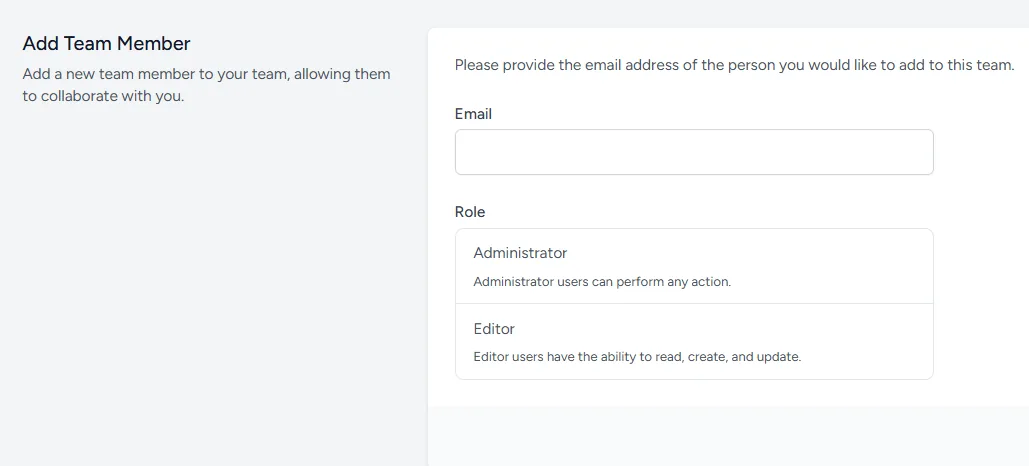
Admins versus regular members
Not every team member should be able to change cost assumptions. A senior dispatcher or owner might be the right person to update fuel prices and adjust fixed-cost figures. A new planner probably should not.
Transport Nomad splits this into two roles:
- Admins. Can edit all team settings: vehicle costs, fuel prices, country price overrides, crossing fees, working days. They see the full cost configuration.
- Regular members. Can plan routes and see the final cost numbers on the map, but cannot see or change the underlying configuration.
This means a planner can quote freight at the correct rates without ever seeing the company's actual margins or cost structure. The map shows the route, the distance, and the price line. What goes into computing that price stays at the admin level.
One account, one team
A Transport Nomad account belongs to exactly one team at a time. This keeps the model clean: when you log in, there is no ambiguity about whose cost numbers you are using.
If someone needs to move from one organisation to another, the flow is:
- The account leaves the current team.
- The new team sends an invitation to the same email address.
- The user accepts and now belongs to the new team, with that team's configuration.
For most transport companies this rarely comes up. For consultants or freelance dispatchers working with multiple operators, the simpler answer is one account per operator they work with.
Summary
Transport pricing only works if everyone in the office is pricing off the same numbers. Transport Nomad's team feature keeps vehicle costs, fuel prices, country overrides, and crossing fees in one shared place that updates for everyone at once. Invite members, decide who has admin rights and who only sees the resulting prices, and your team operates from a single source of cost truth. No more variance between dispatchers, no half-day spreadsheet walkthroughs for new hires, and no catch-up calls after vacation.
See it with your own team. Start the free 14-day trial and set up the cost base your whole office will quote from.