A delivery van pulls up to a paint shop in Lyon. The forklift driver opens the rear doors, grabs the first two pallets and reads the labels. "These are for Geneva." He calls the driver. The driver calls dispatch. Twenty minutes later, with the engine running and the customer's forklift idle, the right pallets get pulled from two rows back, behind the Geneva load. The dispatcher knew the order. The driver didn't. The customer waited.
Nothing about that scene was a planning failure. The plan was correct. The Geneva pallets really should have been at the front; the Lyon pallets really should have come off first. The dispatcher had it right on screen back at base. What broke was the handoff: the plan never left the screen. Once cargo leaves the planner, every person who touches it asks a slightly different question, and unless a single document answers all of them, the warehouse, the cab, and the customer end up working from three different stories.
This guide is about that document. The 3D Load Planner exports a PDF that travels with the cargo and gives each stakeholder the page they actually need.
Five people, five questions
A load plan is read by more people than the dispatcher who made it. Five, in most operations:
The loader at the warehouse asks: where does each pallet go, in what sequence, and which side is the door? He needs the spatial layout and an unambiguous loading order. A wall of numbers does not help him; a picture of the trailer with one group highlighted does.
The driver in the cab asks: what is on board, how is it balanced across the axles, and which pallets come off at each stop? The axle figures matter at the weighbridge; the order numbers matter at every delivery.
The unloader at the customer site asks: what is mine, what is somebody else's, and in what order is it coming off? Especially on multi-drop runs where two or three customers share the same truck, this is where most of the on-site friction sits.
The customer (the consignee) asks: what was actually sent, and if something is missing or damaged, what is my baseline? Without a document at hand at delivery, claims become arguments about memory.
The dispatcher at base asks: was the plan executed, can I share it with the next shift, and can I send it to the customer ahead of arrival? The PDF turns a private mental model into a shareable artefact.
One document with five readers. The PDF separates by page so each person finds their answer fast without reading the rest.
What is actually in the file
The PDF is generated in one click from the planner, and the structure is fixed:
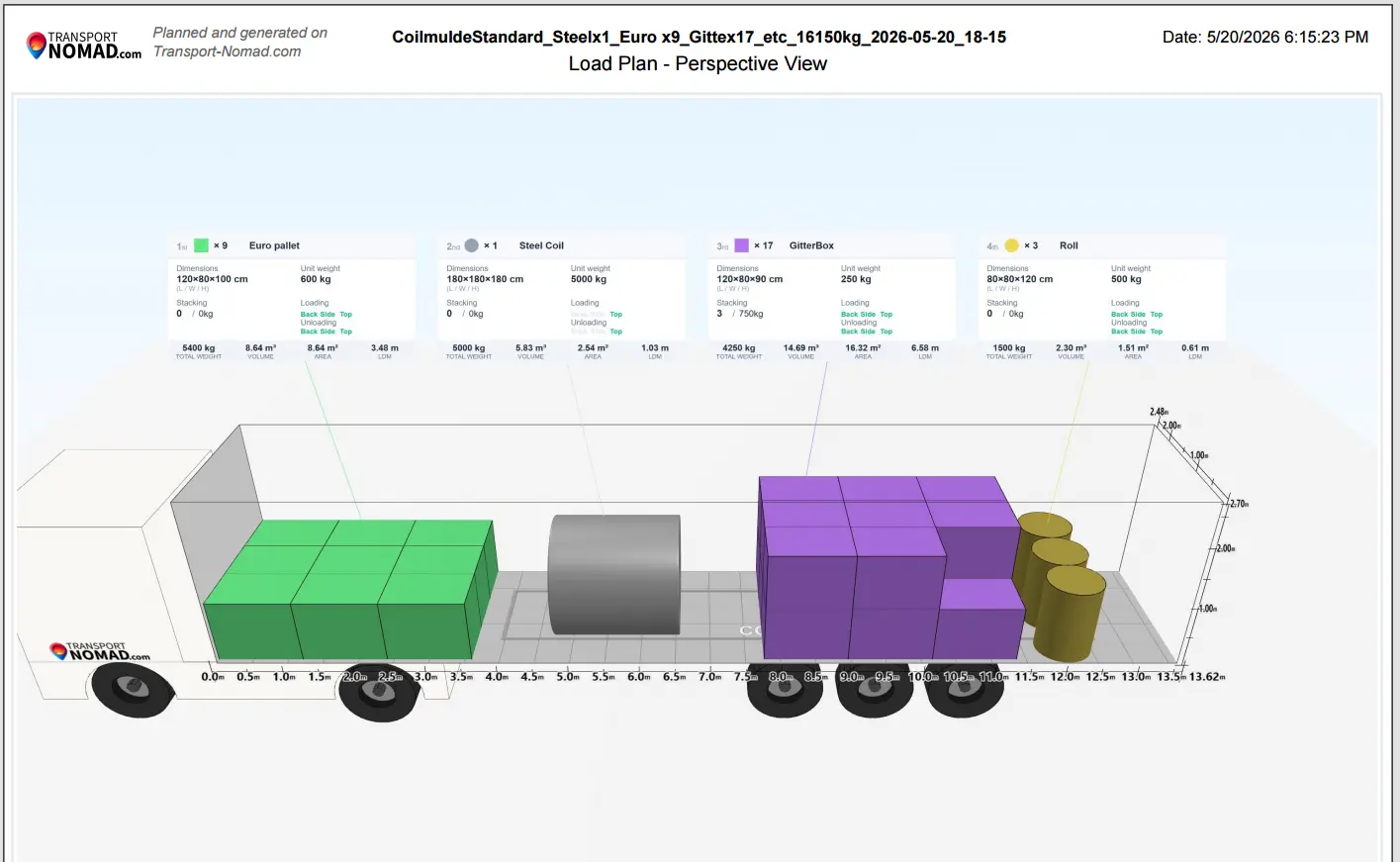
Page 1: Perspective view. A 3D photo-style render of the trailer as it should look after loading. The full layout, in proportion, with every pallet colour-coded by group. This is the page the loader and the receiver use to recognise the load at a glance.
Page 2: Top view. A bird's-eye render of the same trailer floor with the cargo group info boxes arrayed around it. Each box carries the group's order number (1st, 2nd, 3rd, ...), a colour dot, the unit count, the name, and the per-group stats. This is the page the dispatcher uses to talk through the plan and the page the driver uses to find a specific group during a multi-stop run.
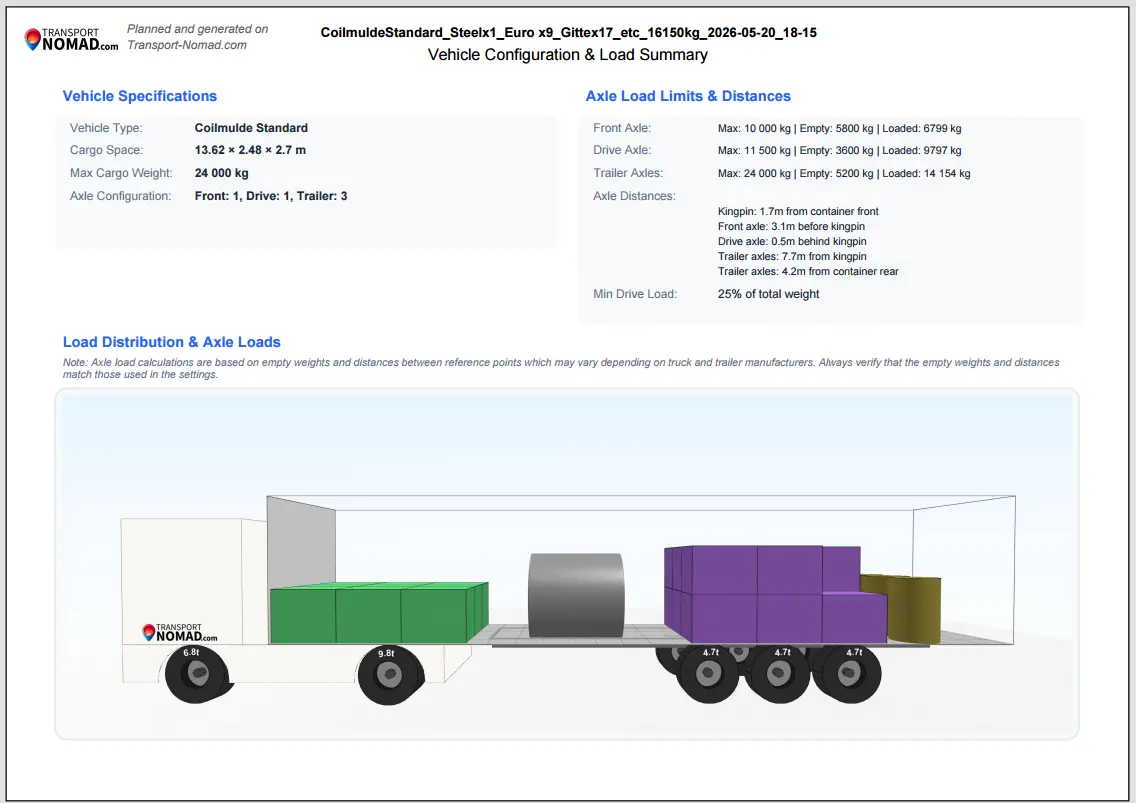
Page 3: Vehicle configuration and load summary. A side profile of the trailer with the live axle distribution graphic underneath, the plan name, the load summary, and the theoretical-readings disclaimer that also lives in the live view. This is the page the driver keeps in the cab. If a weighbridge inspection asks for documentation, this is what the inspector wants to see: a calculated load with axle figures matching the weighbridge ticket.
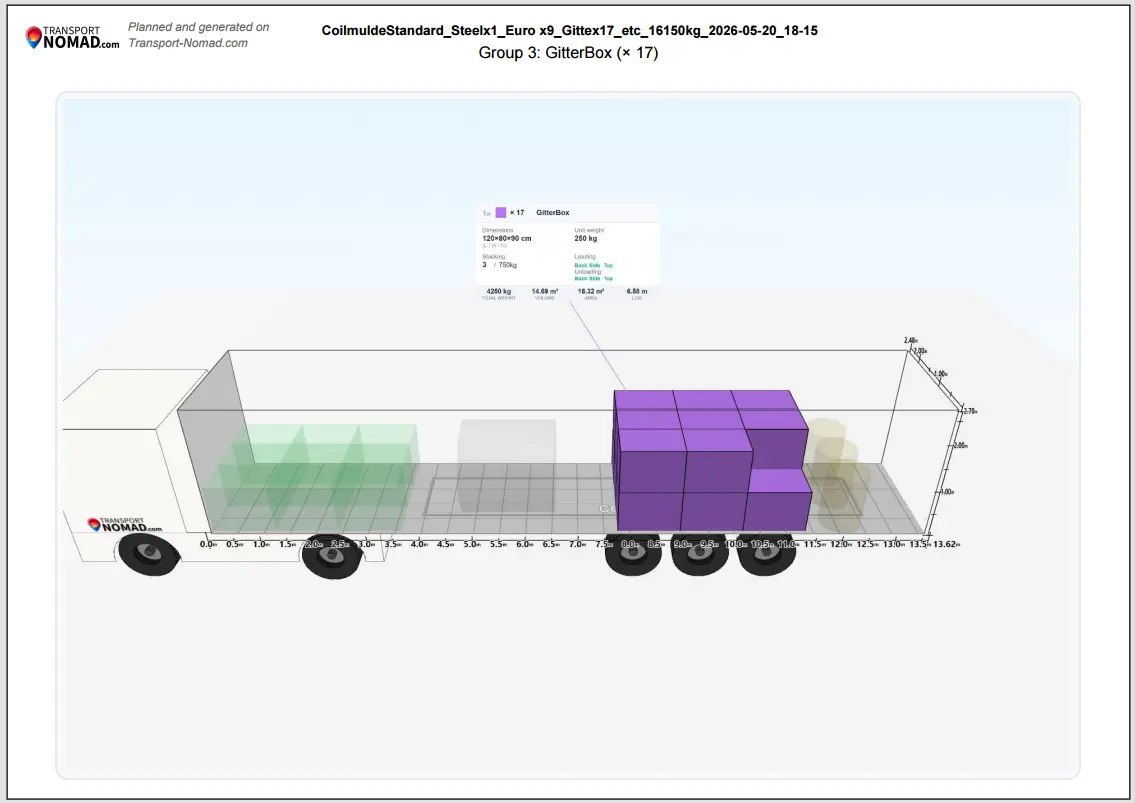
Pages 4 to N: One per cargo group. This is where the PDF stops being a summary and starts being a working document. Every cargo group gets its own page. The header reads "Group 3: GitterBox (× 17)" or similar; the visualisation dims the other groups with transparency and lights up only the selected one. The loader at the dock works through these pages in order: open page 4, place those pallets, open page 5, place those, and so on. No interpretation needed.
Every page carries the same header: plan name centred at the top, Transport Nomad logo top-left, generation date top-right, "Planned and generated on Transport-Nomad.com" watermark. The header is what makes the PDF look like a document rather than a screenshot, which matters when it ends up clipped to a clipboard or attached to a CMR.
How each page lands in a real workflow
The pages are designed to be torn apart and used by different people at different times.
At the warehouse loading dock. The loader prints the per-group pages, or pulls them up on a tablet at the bay door. He works in numerical order. Group 1, group 2, group 3. Each sheet is self-contained: the highlighted group, its quantity, where it sits on the floor of the trailer. No need to scroll through the full plan. No risk of losing track of which row of pallets matches which group. When group 1 is loaded, that page goes to the bottom of the pile and group 2 comes up.
In the driver's cab. The driver carries page 3, the one with the axle figures and side profile. If pulled into a roadside check or onto a weighbridge, he hands it to the inspector. The conversation shifts from "do you have any idea what is on board?" to "here is the planned distribution, the weighbridge ticket should match within a few percent". Inspections that take twenty minutes without paperwork tend to take five with it.
He also carries page 2, the top view with the order numbers. At each delivery stop, he opens the back doors and matches the visible cargo to the highlighted group. Group 1 at this stop means the first row of pallets at the door is the load that comes off here.
At the customer's site. The receiver opens the PDF on a phone or laptop while the truck is reversing in. They scroll to their group page and see exactly what is theirs. If three customers share the truck and the receiver only needs group 5, they jump directly to page 8 (group 5's page) and ignore the rest. This is the moment that the document earns its keep on the receiving side: it removes ambiguity at the dock.
Back at dispatch. The dispatcher sends the PDF to the customer before the truck arrives. Email, Slack, attached to the CMR. The customer pre-confirms the layout. When the truck pulls in, the receiver already knows what to expect. The dispute that would otherwise start with "we never agreed to that load" cannot start, because the agreement is in the customer's inbox with a timestamp.
The same dispatcher can hand the PDF to the next shift. A load planned at 4 PM and dispatched at 6 AM the next day does not depend on one person's memory; the morning dispatcher opens the same file and sees the same plan.
Five conflicts the PDF quietly removes
These come up regularly in operations. Each one is also a cost line on the year-end P&L.
The weighbridge stop with no documentation. Driver gets pulled in. Inspector asks for the load plan. Driver shrugs. The inspector treats the load as unverified and may require a partial offload to weigh by axle manually. That is four hours of dock work, sometimes with a forklift the operator has to pay for. The PDF page 3 changes the dynamic in two minutes.
The "wrong pallets" delivery. Multi-stop run, two stops, similar cargo. Customer at stop A grabs what looks right but is actually for stop B. Discovered at stop B when the right pallets are missing. Truck has to return to stop A, retrieve the pallets, return to stop B. Two hours and a damaged customer relationship. With the PDF in the customer's hand at stop A, the receiver checks the group page first and the pallets stay on the truck.
The damage claim with no baseline. Customer says 18 of 20 pallets arrived undamaged. Were 20 pallets loaded? Were 19? Without a signed loading document there is nothing to contest the claim with, and it gets paid. With a PDF (date, plan name, group breakdown, per-pallet count), the dispatcher has concrete evidence that 20 pallets left the warehouse. Claims that would settle for the cost of two pallets settle for zero.
The shift handover. Dispatcher A plans a complex multi-drop load at the end of his shift. Dispatcher B takes over at the start of hers. Without a shared artefact, the plan lives in A's head and gets reconstructed (imperfectly) by B over the phone the next morning. With the PDF dropped into a shared folder before A leaves, the handover takes thirty seconds.
The driver swap. Driver A loads the truck at the warehouse. Driver B picks it up at a relay point for the long leg. Driver A walks away knowing where everything is; driver B has never seen it. Without the PDF, driver B is opening doors blindly at the first stop. With it, the same per-group pages travel with the truck.
When the PDF is overkill
Not every load needs a full export.
A single-pallet courier delivery, one shipper to one consignee, is fine on a CMR alone. No need to print pages. A move between two internal terminals where everyone has direct access to the planner is also fine without the export. The dispatcher and the loader at both ends can pull up the plan on their own screens.
For everything else — multi-drop runs, mixed shippers, anything with axle figures worth defending, anything where a third party at delivery needs to see what is coming — generate it.
How to generate it
The export is one button in the planner: Export to PDF. The file saves with the current plan's name as the filename, so a plan called "Berlin-Vienna-2026-05-22" exports as Berlin-Vienna-2026-05-22.pdf. No setup, no template selection. The structure described above is the same for every export.
From there: print at the dock for the loader, save to the driver's phone for the cab, send to the customer ahead of arrival, drop in the dispatch folder for handover. One file, five workflows.
End of the series
This is the last guide in the LoadPlanner series. We started with the trailer dimensions that have been standard in European logistics for fifty years, walked through the cargo units that fit inside, looked at how weight has to spread across the axles to stay legal, planned the order in which cargo should be placed so it can be unloaded cleanly, and finished with the document that carries all of that out of the dispatcher's screen and into the hands of everyone else involved.
The point of the planner is not that it makes plans look polished. The point is that a calculated load, planned with the constraints visible at the start, removes the small, daily uncertainties that produce most of the cost in road freight: the unscheduled reload, the missed weighbridge, the customer who didn't know what was coming, the shift handover that went wrong, the claim with no baseline. Each of those is a few hundred to a few thousand euros at a time. None of them are interesting individually. Together they decide whether the year ends in the black.
The PDF is the last small thing. Generate it.
See it on your own load. Start the free 14-day trial, plan tomorrow's trailer in the 3D Load Planner, and hand the driver a PDF instead of a phone call.